QuotaSignal
Your shared ChatGPT and Codex quota, in the menu bar. The weekly allowance you have left, in the macOS menu bar or Windows tray. A notification at 50%, 20%, and 10%.
A live quota check on macOS returned:
check passed: ◉ week 94% left · resets in 6d
Who it is for
People who run the Codex CLI signed in with a ChatGPT account and share one weekly allowance between ChatGPT and Codex. QuotaSignal puts the remaining percentage where you can see it, so you can check it before you start a long task.
It needs Python 3.10 or newer and the Codex CLI. No API key. Setups that use only an API key may have no subscription quota to show.
What sits in the menu bar
The bar shows a percentage. Click it for the weekly figure, the reset time, and the 5-hour window when Codex reports one.
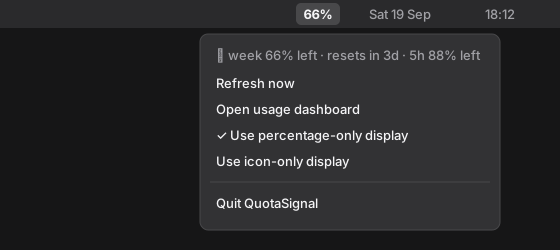
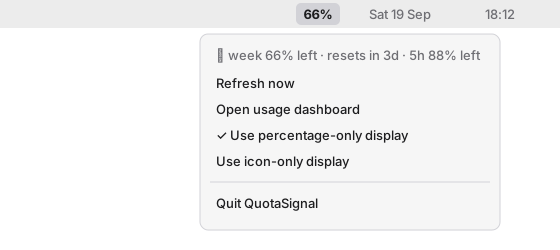
--check output above is from a real quota read.Notifications before you run out
You get one notification when the weekly quota left drops below each level, once per weekly reset. If one refresh crosses several levels, you get a single notification.
Change the levels, or turn notifications off, in ~/.config/quotasignal/config.json:
How it works


Asks the local Codex
QuotaSignal starts codex app-server and requests account/rateLimits/read over stdio. The tray asks once a minute. The command line asks when you run it and reuses a 60-second cache. Codex owns the signed-in session.
No network calls of its own
It has no telemetry and does not read authentication files. Codex talks to OpenAI with your existing ChatGPT login.
Small local files
~/.cache/quotasignal/usage.json holds percentages, reset times, and a plan label. No account identifiers are written to the cache or to --json output.
Install
Requires Python 3.10+ and the Codex CLI, signed in to your ChatGPT account. QuotaSignal is free; your ChatGPT subscription is separate.
-
Clone the repository:
git clone https://github.com/Tatendaz/QuotaSignal.git cd QuotaSignal -
Create an environment and install the app:
python3 -m venv .venv source .venv/bin/activate python -m pip install ".[menu]" -
Check access, then start the indicator:
quotasignal --check quotasignal tray
On Windows, use py -m venv .venv and .venv\Scripts\Activate.ps1. For startup at login, run ./scripts/install-macos.sh or .\scripts\install-windows.ps1. See the installation details.
Status
Version 0.1.0, released 2026-09-19 and marked alpha. The source install above is the documented path. These limits apply today:
- The macOS menu bar item has been used on Apple silicon. Windows tests run in CI, but the real Windows tray and installers have not been checked on hardware yet.
- Linux gets the command line only.
- The Codex app-server API is experimental and can change between CLI releases.
- Desktop builds are unsigned.
- Crowded macOS menu bars can hide the item. Windows may put it in the overflow area.
Next steps are in the roadmap. Bugs go to GitHub issues.